---
title: "Move test applications between states"
description: "Take any sandbox offer through to funded, or to any step in between, in the Developer Portal or with the API"
---
> For the complete documentation index, see [llms.txt](/llms.txt).
In sandbox, you can take a test application with any offer through to funded, or stop it at any step in between.
You do it yourself, in the Developer Portal or with the API, without going through the customer journey on iwoca.
Use it to make sure your user experience matches each change in the application's state, and that your webhooks fire as intended.
It's required for API Plus and optional for API Lite.
Either way, it helps you self-serve your testing and make sure your integration is robust.
## Before you start
Create a test application with any offer, using the [test data](/guides/testing/decision-relayed-testing#simulating-different-outcomes).
When you move it on, iwoca runs every step in between for you.
## Move your application to a new state
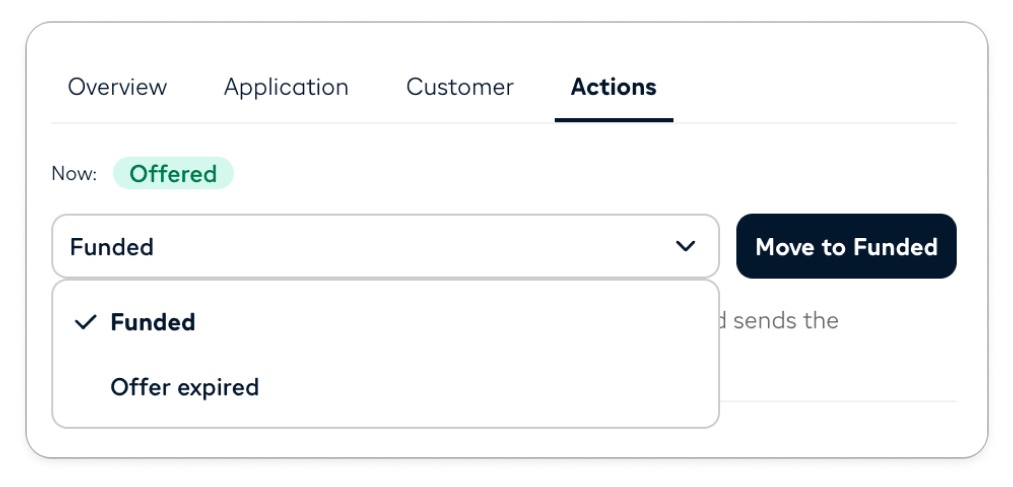
In the Developer Portal, open the **Applications** tab and select your test application.
Open the **Actions** tab.
It shows the state your application is in now, and the states you can move it to.
Pick a state from the list, then select **Move to**.
```http
GET /sandbox/customers/{customer_id}/
```
**You'll need:**
- The `customer_id` you created the test application with
**Response:** You'll receive the `state` your application is in now, and the `reachable_states` you can move it to.
See Get sandbox customer's state.
```http
PATCH /sandbox/customers/{customer_id}/
```
**You'll need:**
- A request body with one of the `reachable_states`, for example `{"data": {"state": "funded"}}`
**Response:** You'll receive the new `state`.
See Move sandbox customer into a state.
Both endpoints are available from v2.2.
## States you can move to
| State | What it means |
|---|---|
| `data_requirements_complete` | iwoca has everything it needs and is making a decision. |
| `offered` | Your customer has a confirmed offer to accept. |
| `funded` | Your customer has accepted, and the funds have been paid out. |
| `offer_expired` | Your customer didn't accept their offer in time. |
| `deferred` | The application closed before a decision, for example because your customer stopped responding. |
| `declined` | iwoca can't lend to your customer. |
Applications only move forwards.
A confirmed offer starts at `offered`, and other offers start earlier, so they can also stop at `data_requirements_complete`, or be deferred or declined.
See Get sandbox customer's state for every state.
## Check your integration
After each move, check your platform handles it the same way it will in production:
- Your platform shows your customer the right experience for the new state.
- `GET /customers/{customer_id}/applications/latest/` returns the right `application_status`, for example `funded`.
- Your webhook endpoint receives the webhooks you subscribe to, for example `application_status_changed`.
See [webhook event types](/guides/webhooks/event-types) for which webhook fires when.
---
## Next steps
Submit your integration for review and launch to production
Real-time notifications on application status changes